
Patterns
See what is shifting across the trust
Start with reporting if you need a clean view of marker distribution, appraiser consistency, or differences between schools and staff groups.
Move between role journeys, reference tools, and source materials without losing your place.
Organisation Journey
This route shows how the platform supports more consistent manager practice, better reporting, and clearer organisational insight beyond the individual meeting.
This route is busiest when read straight through. It becomes much easier to use if you enter through the question you are actually trying to answer.
Start with reporting if you need a clean view of marker distribution, appraiser consistency, or differences between schools and staff groups.
Start with operational controls if you are thinking about permissions, completion, bulk changes, leavers, or how leaders act on the data.
Start with wider capabilities if you want appraisal insight to feed training, opportunity pathways, 360 feedback, reflective tools, and local help content.
The value is not just that meetings are easier to run. It is that the organisation can see more clearly what those meetings are telling it.
Once the conversations are in one place, leaders can start spotting patterns instead of relying on local memory and isolated judgement.
See where markers are clustering, compare appraisers or schools, and drill into outliers by marker type, date range, staffing group, or any configured slider dimensions that help explain the pattern.
Look at patterns through charts and exportable tables using the profile fields your organisation has chosen to capture.
Give line managers, headteachers, HR, and admins the visibility they need without treating every audience the same.
The reporting layer is not one generic dashboard. It gives leaders different ways to read concentration, compare groups, and move from an organisational pattern into an individual record.
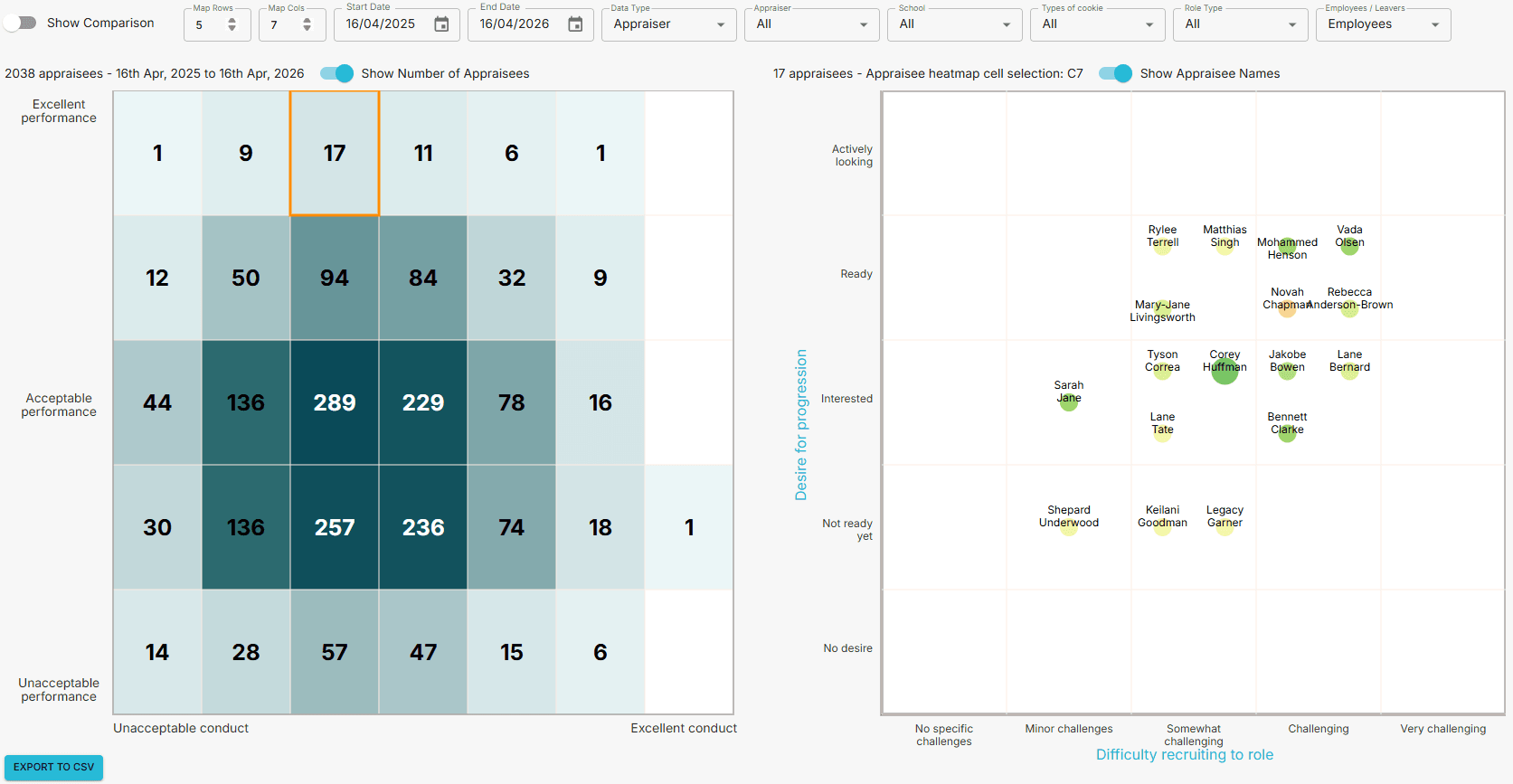
The heat map view shows how markers are distributed across the trust and can be filtered by date range, marker type, appraiser, school, staff group, and leaver status.
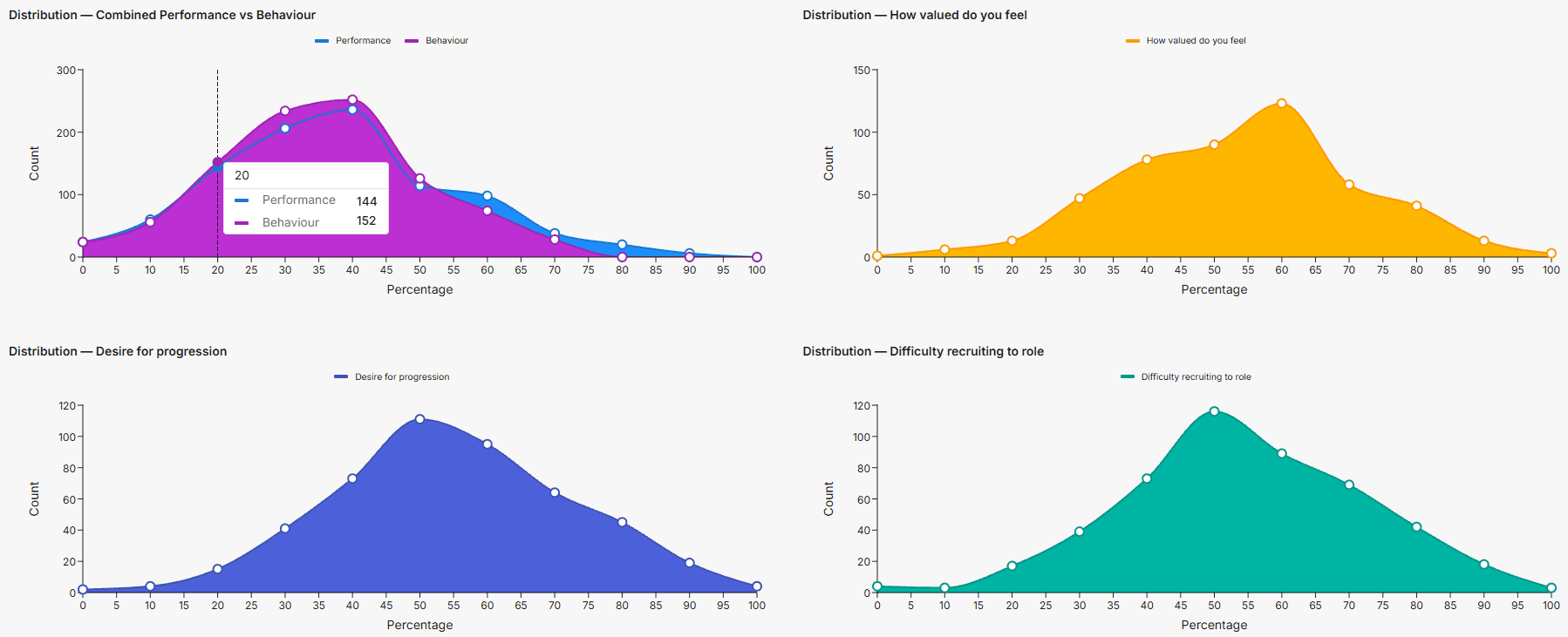
Distribution views and exportable tables let leaders read patterns through the profile fields the trust has chosen to capture, such as job family, contract type, or demographic grouping.
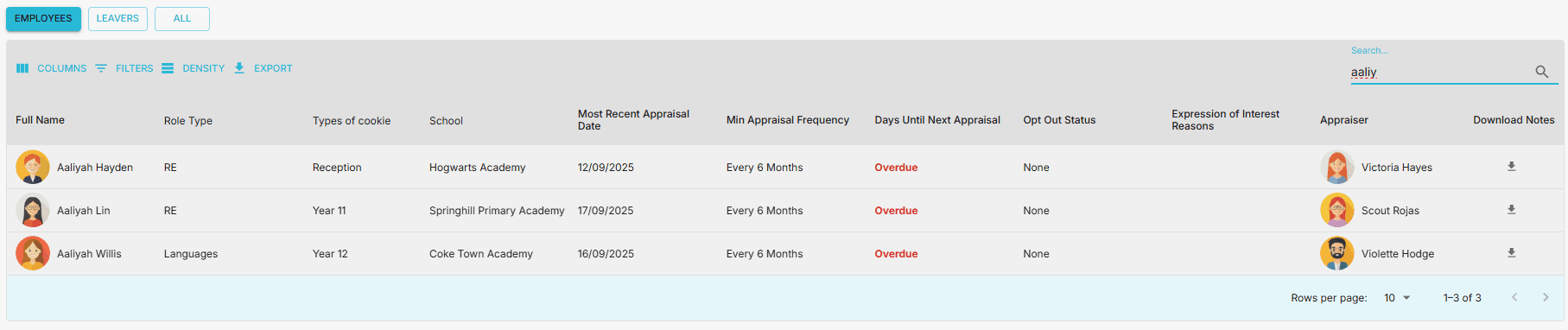
Operational views make it easier to filter staff, track appraisal completion, inspect manager caseloads, and persist the table layout each audience needs.
The deck goes beyond reporting screens. It also describes the practical controls that make the platform workable once schools, staff structures, and data categories start changing over time.
Selecting part of the heat map can populate a second analytical view, including any configured slider outputs, helping leaders move from pattern spotting into specific people, markers, and profiles that need a closer look.
Different groups can see different operational views, from line managers checking direct-report completion through to HR and trust admins working across the wider organisation.
Compare appraisers, schools, staffing groups, or date ranges deliberately so leaders can spot where a pattern is local and where it is trust-wide.
Manager-facing views can surface direct-report counts, appraisal completion, and opt-out patterns where the trust has chosen to enable them.
Operational tables can be filtered, searched, resized, reordered, and customised so working views stay useful instead of resetting every time.
The real value comes when a pattern in the data leads to a follow-up conversation, support offer, development action, or deeper diagnostic tool.
The source pack makes a useful distinction here: reporting is only valuable if leaders can also change data cleanly, manage leavers, control access, and route people from a pattern on the screen to a real follow-up action.
The source pack is clear on this point: appraisal becomes more useful when it connects to development activity, opportunity signals, deeper feedback tools, practical help content, and cleaner people-data handling.
Use CPD tracking and expressions of interest to connect review conversations with development, succession, and internal opportunity planning.
Use 360 and reflective tools selectively when one appraisal conversation is not enough to surface the pattern clearly.
Use built-in help, bulk data workflows, and stronger leaver handling so the system stays useful after rollout, not just at launch.
These are not side features. They are the parts that turn a single appraisal meeting into an ongoing professional growth and organisational insight model.
Keep professional growth linked to real learning activity, including certificates, cost, duration, categorisation, and evaluation where needed.
Capture signals around promotion, secondments, internal opportunities, projects, and future career direction in one place.
Run configurable 360 requests for individuals, teams, schools, or the wider trust with options around anonymity, written feedback, and grouped responses.
Use deeper reflective tools to explore individual characteristics or the culture of a team, school, or whole organisation with configurable templates.
Export tables as CSV, download full user data, and make large structural updates without having to edit every record one by one.
Bring local help into the system and manage leavers with more useful operational detail so the organisation keeps continuity as people move.
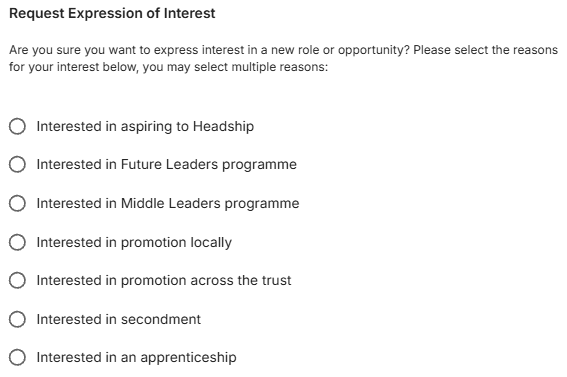
Expressions of interest can surface aspiration early, from leadership pathways through to secondments, internal projects, and other local opportunities.
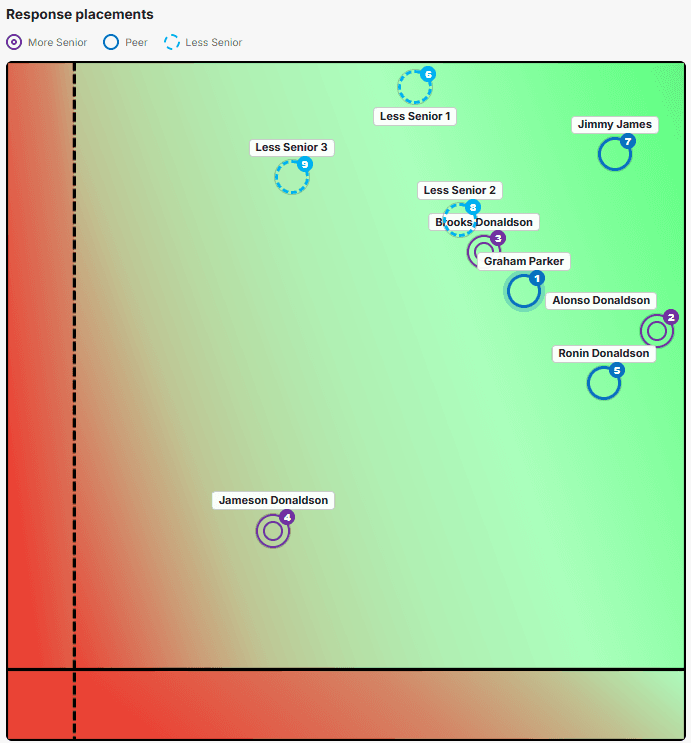
360 feedback can separate less senior, peer, and more senior responses, giving leaders a clearer view of where alignment and mismatch are emerging.
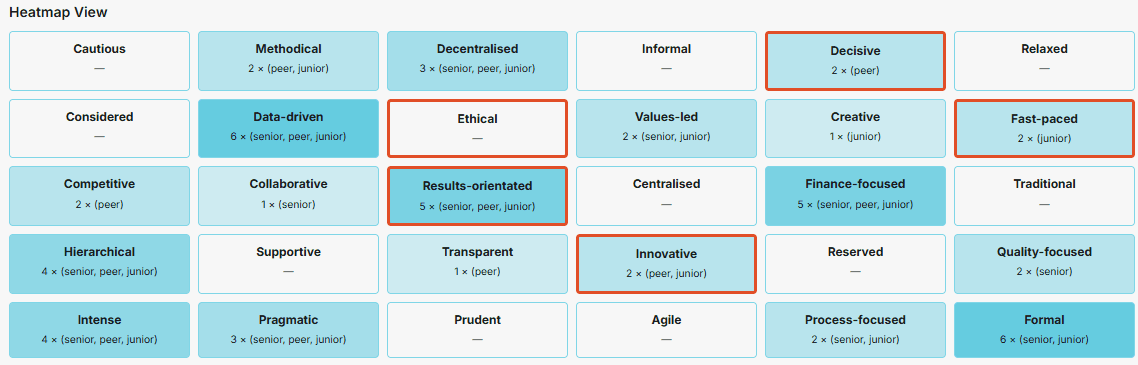
Johari or reflective-window style views can be used to explore how traits or cultural descriptors are clustering across a person, team, school, or wider organisation.
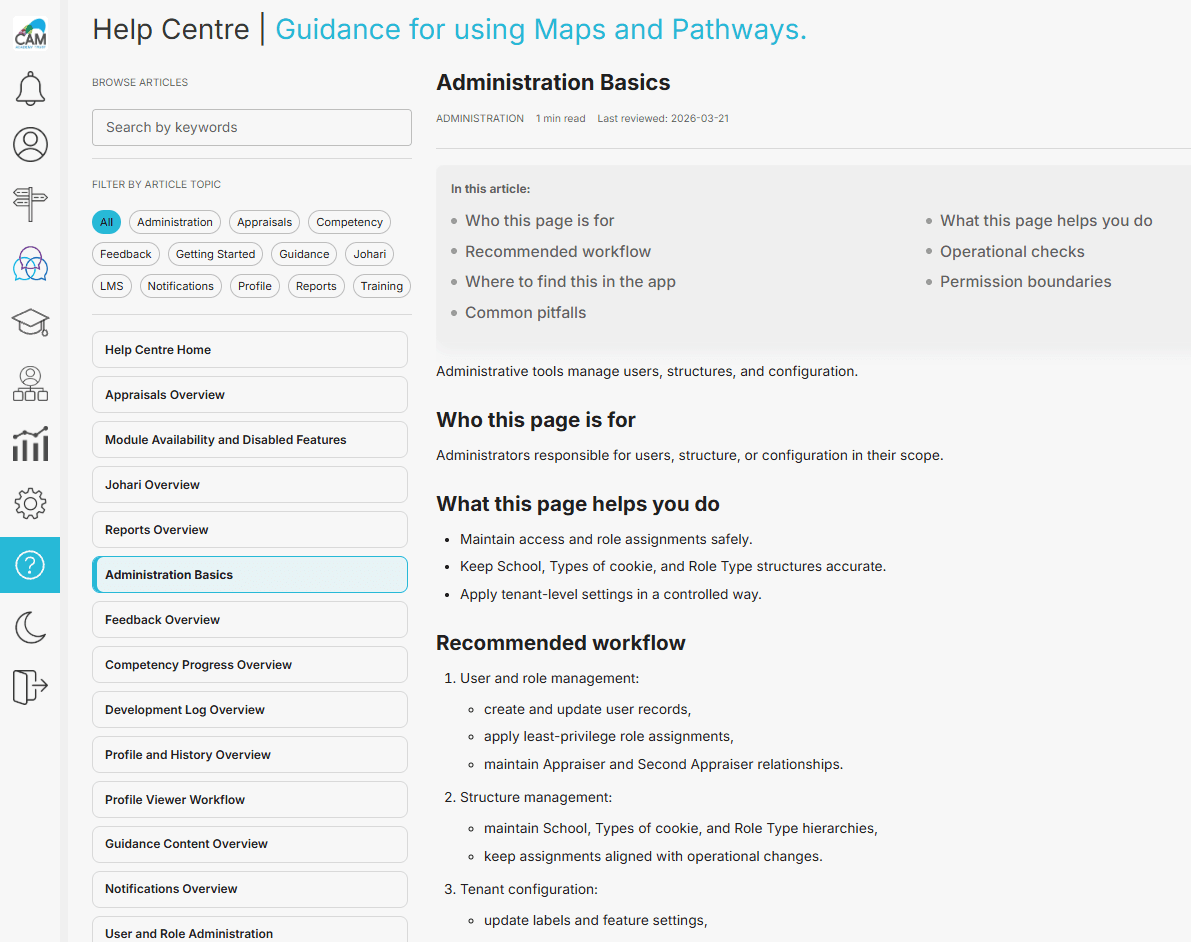
A built-in help centre can carry searchable guidance, local workflows, standards links, and videos that reflect the trust's actual configuration and practice.
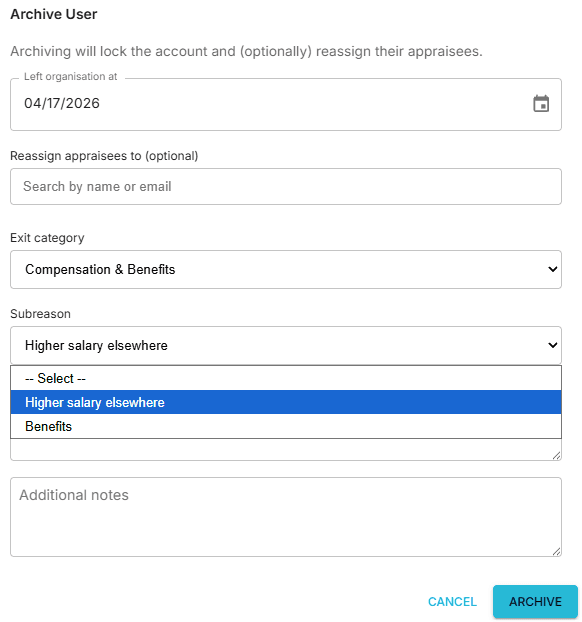
Leaver handling can capture exit categories and subreasons, support reassignment of appraisees, and preserve the record if someone later returns.
A better rollout starts with a few deliberate decisions about language, data, and how managers will make judgements.
Labels, note headings, slider names, data fields, and many interface terms are configurable so the platform can sound like your trust rather than a generic system.
Choose whether performance guidance should be more absolute or more contextualised. That decision shapes the examples and training managers work from.
Heat map granularity, the fields captured in user profiles, the category values inside those fields, and even which markers are analysed can all be tailored around the insight the trust actually wants.
Different audiences need different operational views. Be deliberate about what line managers, headteachers, HR, and organisation admins can see and act on.
Most profile fields and categories are optional. Keep the model useful and proportionate, while still capturing the structure needed for reporting and later pathway work.
Appraisal, one-to-one, induction, and probationary meetings do not all need the same structure. Decide where marker placement is genuinely useful, and where lighter note-based workflows are enough.
Up to three extra sliders can be added with configurable labels, ranges, and visibility. Use them when they feed useful discussion and reporting, not because more inputs automatically mean better insight.
Think early about leaver coding, bulk data updates, school changes, and local help content. Those operational details shape whether rollout feels sustainable after launch.